
Apply additional filtering to the MRU data output based on your application. This may change the data characteristics.
-
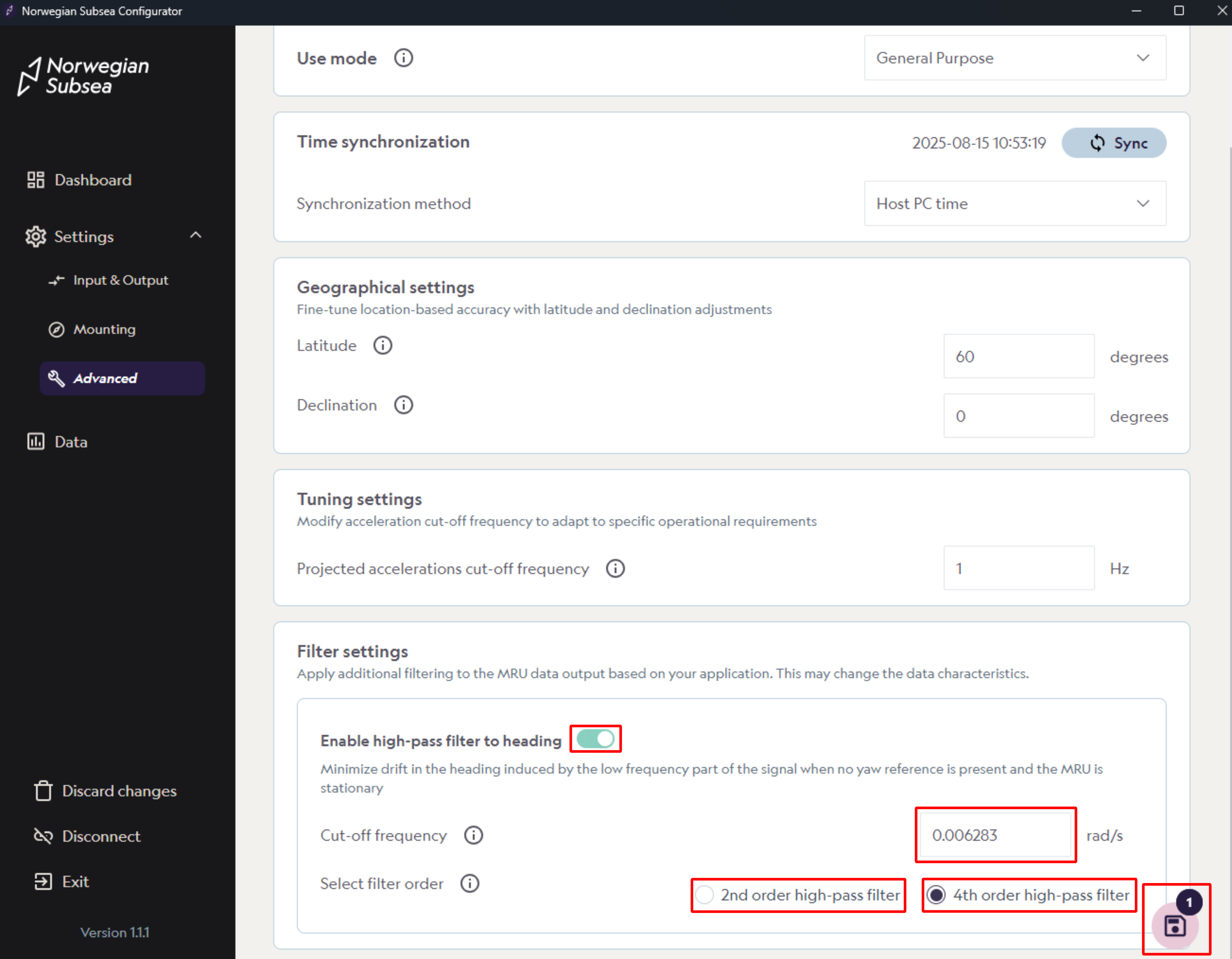
Enable high-pass filter to heading: Minimize drift in the heading induced by the low frequency part of the signal when no yaw reference is present and the MRU is stationary.
-
Cut-off frequency: Set cut-off frequency based on your application.
-
A high cut-off frequency minimizes the noise on the output signal but introduces significant phase shifts.
-
A low cut-off frequency reduces the phase shift between the input and output signals but allows more noise to pass through.
-
Default value: 2pi/100 [rad/s]
-
-
Select filter order:
-
2nd order high-pass filter: 2nd order highpass filter is used to filter yaw estimates.
-
4th order high-pass filter: 4th order highpass filter is used to filter yaw estimates.
-
Note: A higher order offers a sharper cut-off and more aggressive filtering.
-
-
-
Follow these steps to configure filter settings:
-
In the filter section, enable the “high-pass filter to heading” button
-
Change cut-off frequency, if needed.
-
Select either 2nd order highpass filter or 4th order high-pass filter
-
Click Save
API
You can also configure filter settings through the API .